Chat Memory 简介 解决的问题 在开发大模型应用时,大模型本身是无状态的(它不会记得你上一句说了什么)。为了让它能像人类一样联想上下文,我们需要赋予它 “记忆力”。在 LangChain4j 中,这个功能被称为 Chat Memory (聊天记忆)。它的底层原理非常简单粗暴:把历史对话存在内存或数据库中,每次用户发送新消息时,把历史记录和新消息打包一起发送给大模型。
核心的组件 Langchain4j 的 Chat Memory 包含两个最核心的组件:ChatMemory 和 ChatMemoryProvider。
ChatMemory(记忆体):负责管理单次会话的记录。默认提供以下两种 ChatMemory。
MessageWindowChatMemory(滑动窗口记忆):只保留最近的 N 条消息。超过限制后,最早的消息会被踢出。这种方式最常用,能有效防止提示词超长并节省 Token。
TokenWindowChatMemory(Token 窗口记忆):精确计算消息的 Token 数,只保留最近指定 Token 总量内的对话,比消息条数更严谨。
ChatMemoryProvider(记忆供应商/池):负责管理多用户、多会话的隔离。在 Web 开发中,我们不能让张三看到李四的聊天记录。ChatMemoryProvider 就像一个酒店前台,它会根据你提供的 @MemoryId(房间号,如用户 ID 或 Session ID),为每个用户分配一个独立的 ChatMemory。
演示案例 基础写法 依赖配置
1 2 3 4 5 6 7 8 9 10 11 12 13 14 15 16 17 <dependency > <groupId > dev.langchain4j</groupId > <artifactId > langchain4j-open-ai</artifactId > <version > 1.17.2</version > </dependency > <dependency > <groupId > dev.langchain4j</groupId > <artifactId > langchain4j</artifactId > <version > 1.17.2</version > </dependency > <dependency > <groupId > ch.qos.logback</groupId > <artifactId > logback-classic</artifactId > <version > 1.5.34</version > </dependency >
演示代码:
1
2
3
4
5
6
7
8
9
10
11
12
13
14
15
16
17
18
19
20
21
22
23
24
25
26
27
28
29
30
31
32
33
34
35
36
37
38
39
40
41
42
43
44
45
46
47
48
49
50
51
52
53
54
55
56
57
58
59
import dev.langchain4j.memory.chat.MessageWindowChatMemory;import dev.langchain4j.model.chat.ChatModel;import dev.langchain4j.model.openai.OpenAiChatModel;import dev.langchain4j.service.AiServices;import dev.langchain4j.service.MemoryId;import dev.langchain4j.service.UserMessage;import java.time.Duration;public class ChatMemoryDemo { interface UserChatService { String chat (@MemoryId String userId, @UserMessage String message) ; } public static void main (String[] args) { System.setProperty("langchain4j.http.clientBuilderFactory" , "dev.langchain4j.http.client.jdk.JdkHttpClientBuilderFactory" ); ChatModel chatModel = OpenAiChatModel.builder() .baseUrl("http://localhost:11434/v1" ) .apiKey("api_key_xxx" ) .modelName("qwen3:4b" ) .timeout(Duration.ofSeconds(300 )) .maxRetries(3 ) .logRequests(true ) .logResponses(true ) .build(); UserChatService chatService = AiServices.builder(UserChatService.class) .chatModel(chatModel) .chatMemoryProvider(userId -> MessageWindowChatMemory.withMaxMessages(10 )) .build(); System.out.println("=== 👤 场景 1:张三入场 ===" ); String r1 = chatService.chat("user_zhangsan" , "你好,我是张三。" ); System.out.println("AI 回复: " + r1); System.out.println("\n=== 👤 场景 2:李四入场 ===" ); String r2 = chatService.chat("user_lisi" , "你好,我是李四。" ); System.out.println("AI 回复: " + r2); System.out.println("\n=== 场景 3:测试张三的记忆 ===" ); String r3 = chatService.chat("user_zhangsan" , "请问我是谁?" ); System.out.println("AI 告诉张三: " + r3); System.out.println("\n=== 场景 4:测试李四的记忆 ===" ); String r4 = chatService.chat("user_lisi" , "请问我是谁?" ); System.out.println("AI 告诉李四: " + r4); } }
日志输出(展示和LLM的交互过程):1 2 3 4 5 6 7 8 9 10 11 12 13 14 15 16 17 18 19 20 21 22 23 24 25 26 27 28 29 30 31 32 33 34 35 36 37 38 39 40 41 42 43 44 45 46 47 48 49 50 51 52 53 54 55 56 57 58 59 60 61 62 63 64 65 66 67 68 69 70 71 72 73 74 75 76 77 78 79 80 81 82 83 84 85 86 87 88 89 90 91 92 93 94 95 96 97 98 99 100 101 === 👤 场景 1:张三入场 === [main] INFO dev.langchain4j.http.client.log.LoggingHttpClient -- HTTP request: - method: POST - url: http://localhost:11434/v1/chat/completions - headers: [Authorization: Beare...xx], [User-Agent: langchain4j-openai], [Content-Type: application/json] - body: { "model" : "qwen3:4b", "messages" : [ { "role" : "user", "content" : "你好,我是张三。" } ], "stream" : false } [main] INFO dev.langchain4j.http.client.log.LoggingHttpClient -- HTTP response: - status code: 200 - headers: [content-type: application/json], [date: Sat, 11 Jul 2026 02:49:37 GMT], [transfer-encoding: chunked] - body: {"id":"chatcmpl-983","object":"chat.completion","created":1783738177,"model":"qwen3:4b","system_fingerprint":"fp_ollama","choices":[{"index":0,"message":{"role":"assistant","content":"好的,用户说“你好,我是张三。”,首先我要做一个友好的回应...你好,张三!很高兴认识你,有什么需要帮忙的吗? 😊"},"finish_reason":"stop"}],"usage":{"prompt_tokens":16,"completion_tokens":1455,"total_tokens":1471}} AI 回复: 好的,用户说“你好,我是张三。”,首先我要做一个友好的回应...你好,张三!很高兴认识你,有什么需要帮忙的吗? 😊 === 👤 场景 2:李四入场 === [main] INFO dev.langchain4j.http.client.log.LoggingHttpClient -- HTTP request: - method: POST - url: http://localhost:11434/v1/chat/completions - headers: [Authorization: Beare...xx], [User-Agent: langchain4j-openai], [Content-Type: application/json] - body: { "model" : "qwen3:4b", "messages" : [ { "role" : "user", "content" : "你好,我是李四。" } ], "stream" : false } [main] INFO dev.langchain4j.http.client.log.LoggingHttpClient -- HTTP response: - status code: 200 - headers: [content-type: application/json], [date: Sat, 11 Jul 2026 02:50:51 GMT], [transfer-encoding: chunked] - body: {"id":"chatcmpl-659","object":"chat.completion","created":1783738251,"model":"qwen3:4b","system_fingerprint":"fp_ollama","choices":[{"index":0,"message":{"role":"assistant","content":"嗯,用户打招呼说“你好,我是李四。”,看起来他是在进行初次互动。...你好,李四!我是小AI助手,很高兴认识你~ 有什么我可以帮你的吗?😊"},"finish_reason":"stop"}],"usage":{"prompt_tokens":16,"completion_tokens":420,"total_tokens":436}} AI 回复: 嗯,用户打招呼说“你好,我是李四。”,看起来他是在进行初次互动。...你好,李四!我是小AI助手,很高兴认识你~ 有什么我可以帮你的吗?😊 === 场景 3:测试张三的记忆 === [main] INFO dev.langchain4j.http.client.log.LoggingHttpClient -- HTTP request: - method: POST - url: http://localhost:11434/v1/chat/completions - headers: [Authorization: Beare...xx], [User-Agent: langchain4j-openai], [Content-Type: application/json] - body: { "model" : "qwen3:4b", "messages" : [ { "role" : "user", "content" : "你好,我是张三。" }, { "role" : "assistant", "content" : "好的,用户说“你好,我是张三。”,首先我要做一个友好的回应。...你好,张三!很高兴认识你,有什么需要帮忙的吗? 😊" }, { "role" : "user", "content" : "请问我是谁?" } ], "stream" : false } [main] INFO dev.langchain4j.http.client.log.LoggingHttpClient -- HTTP response: - status code: 200 - headers: [content-type: application/json], [date: Sat, 11 Jul 2026 02:55:30 GMT], [transfer-encoding: chunked] - body: {"id":"chatcmpl-402","object":"chat.completion","created":1783738530,"model":"qwen3:4b","system_fingerprint":"fp_ollama","choices":[{"index":0,"message":{"role":"assistant","content":"嗯,用户突然问“请问我是谁?”,这挺有意思的。之前他自我介绍说是“张三”,...所以,严格来说:**你 = 张三**,而 **我 = 你的AI小助手**,正在认真回答你的问题呢!要不要接着聊聊? 😄"},"finish_reason":"stop"}],"usage":{"prompt_tokens":1484,"completion_tokens":647,"total_tokens":2131}} AI 告诉张三: 嗯,用户突然问“请问我是谁?”,这挺有意思的。之前他自我介绍说是“张三”...所以,严格来说:**你 = 张三**,而 **我 = 你的AI小助手**,正在认真回答你的问题呢!要不要接着聊聊? 😄 === 场景 4:测试李四的记忆 === [main] INFO dev.langchain4j.http.client.log.LoggingHttpClient -- HTTP request: - method: POST - url: http://localhost:11434/v1/chat/completions - headers: [Authorization: Beare...xx], [User-Agent: langchain4j-openai], [Content-Type: application/json] - body: { "model" : "qwen3:4b", "messages" : [ { "role" : "user", "content" : "你好,我是李四。" }, { "role" : "assistant", "content" : "嗯,用户打招呼说“你好,我是李四。”,看起来他是在进行初次互动。...你好,李四!我是小AI助手,很高兴认识你~ 有什么我可以帮你的吗?😊" }, { "role" : "user", "content" : "请问我是谁?" } ], "stream" : false } [main] INFO dev.langchain4j.http.client.log.LoggingHttpClient -- HTTP response: - status code: 200 - headers: [content-type: application/json], [date: Sat, 11 Jul 2026 02:58:41 GMT], [transfer-encoding: chunked] - body: {"id":"chatcmpl-661","object":"chat.completion","created":1783738721,"model":"qwen3:4b","system_fingerprint":"fp_ollama","choices":[{"index":0,"message":{"role":"assistant","content":"首先,用户问:“请问我是谁?”这是一个元问题,需要我理解上下文。\n\n回顾之前的对话:\n- 用户第一次说:“你好,我是李四。”...所以你自称是李四呀~😊 作为你的AI助手,我只能告诉你:**你就是你自己**,而我是小AI助手,专门帮你解决问题的!有什么需要我帮忙的吗?"},"finish_reason":"stop"}],"usage":{"prompt_tokens":449,"completion_tokens":868,"total_tokens":1317}} AI 告诉李四: 首先,用户问:“请问我是谁?”这是一个元问题,需要我理解上下文。...回顾之前的对话: - 用户第一次说:“你好,我是李四。” ... 你好!在我们刚才的对话中,你提到“我是李四”,所以你自称是李四呀~😊 作为你的AI助手,我只能告诉你:**你就是你自己**,而我是小AI助手,专门帮你解决问题的!有什么需要我帮忙的吗?
高阶写法 依赖配置:
1 2 3 4 5 6 7 8 9 10 11 12 13 14 15 16 17 18 19 20 21 22 23 24 25 <dependencies > <dependency > <groupId > dev.langchain4j</groupId > <artifactId > langchain4j-open-ai-spring-boot-starter</artifactId > </dependency > <dependency > <groupId > dev.langchain4j</groupId > <artifactId > langchain4j-spring-boot-starter</artifactId > </dependency > <dependency > <groupId > dev.langchain4j</groupId > <artifactId > langchain4j-reactor</artifactId > </dependency > <dependency > <groupId > org.springframework.boot</groupId > <artifactId > spring-boot-starter-webflux</artifactId > </dependency > </dependencies >
第一步:配置文件或配置类注入大模型,这里使用简单的配置文件
1
2
3
4
5
6
7
8
9
10
11
12
13
14
15
16
17
18
19
20
21
22
23
24
25
26
27
28
29
30
31
server: port: 8080 servlet: encoding: charset: UTF-8 enabled: true force: true langchain4j: open-ai: chat-model: base-url: https://dashscope.aliyuncs.com/compatible-mode/v1 api-key: ${QWEN_API_KEY} model-name: qwen3.7-plus log-requests: true log-responses: true streaming-chat-model: base-url: http://localhost:11434/v1 api-key: api-key-xxx model-name: "qwen3:4b" log-requests: true log-responses: true timeout: PT300S logging: level: root: INFO dev.langchain4j: DEBUG
声明和装配 AiService:
1
2
3
4
5
6
7
8
9
10
11
12
13
14
15
public interface UserChatService { Flux<String> chat (@MemoryId Long userId, @UserMessage String message) ; } @Configuration public class LLMConfig { @Bean public UserChatService userChatService (StreamingChatModel streamingChatModel) { return AiServices.builder(UserChatService.class) .streamingChatModel(streamingChatModel) .chatMemoryProvider(memoryId -> MessageWindowChatMemory.withMaxMessages(10 )) .build(); } }
测试 controller:
1
2
3
4
5
6
7
8
9
10
11
12
@RestController @RequestMapping("/memory-test") public class ChatMemoryForUserTestController { @Resource private UserChatService userChatService; @GetMapping(value = "/chat", produces = MediaType.TEXT_PLAIN_VALUE) public Flux<String> chat (@RequestParam Long userId, @RequestParam String message) { return userChatService.chat(userId, message); } }
TokenWindowChatMemory 以上我们使用了 MessageWindowChatMemory 进行测试。MessageWindowChatMemory 是按条数裁剪,适合短会话、强可控场景。而 TokenWindowChatMemory 按 token 数裁剪,适合长上下文、成本敏感、模型上下文有限的场景。另外需要注意,两种 Memory 都不会主动丢弃 SystemMessage,SystemMessage 的消息始终会被保留,不会被裁剪,默认也不会被 tokenizer 计入窗口(TokenWindow 默认)。如果你希望 SystemMessage 也参与 token 计算:
1
2
3
4
5
6
7
8
9
10
11
12
13
14
15
16
17
18
19
20
21
22
@Bean public UserChatService userChatService1 (StreamingChatModel streamingChatModel) { return AiServices.builder(UserChatService.class) .streamingChatModel(streamingChatModel) .chatMemoryProvider(memoryId -> TokenWindowChatMemory.builder() .maxTokens(1000 , new OpenAiTokenCountEstimator (OpenAiChatModelName.GPT_5)) .alwaysKeepSystemMessageFirst(true ) .build() ) .build(); } @Bean public UserChatService userChatService2 (StreamingChatModel streamingChatModel) { return AiServices.builder(UserChatService.class) .streamingChatModel(streamingChatModel) .chatMemoryProvider(memoryId -> MessageWindowChatMemory.builder() .alwaysKeepSystemMessageFirst(true ) .dynamicMaxMessages(userId -> 1000 ) .build()) .build(); }
记忆持久化的必要性 大模型的记忆之所以需要持久化(保存到 Redis、MySQL、MongoDB 等数据库中),最根本的原因是:内存是短暂的、易失的,而真实世界的企业应用必须保证服务的连续性和高可用。如果不做持久化,默认的记忆只能存在 JVM 的内存(如 HashMap)里。这会带来三个致命的灾难性问题:
服务器重启,记忆全部断片。每次你的 Java 服务重新打包部署或者 JVM 重启,内存中的变量会被全部清空。用户正聊得火热,你一发版,大模型突然翻脸不认人,问用户:“你是谁?”。
无法应对多实例集群部署。用户第一句 “我是张三” 发到了服务器 A,A 的内存里记住了他是张三。第二句“我叫什么”被网关随机分发到了服务器 B,B 的内存里空空如也,直接回答“不知道”。这就导致大模型精神分裂。
内存溢出风险:随着用户量的激增,如果所有人的记忆都塞在 JVM 堆内存中,内存很快就会爆掉。内存里只保留当前处理的一瞬间数据,处理完立刻释放。海量的历史数据交给专业的数据库去建立索引、分库分表、设置过期时间(TTL)。
社区版 ChatMemoryStore 环境准备 在 LangChain4j 中,从内存记忆切换到持久化记忆非常优雅,你不需要去改动任何 AiServices 或者控制器的业务逻辑,只需要换一个 ChatMemoryStore 的底层实现即可。通过这一层抽象,LangChain4j 帮我们把业务逻辑(智能体)与数据存储(数据库)完全解耦了。
比如,我们使用社区版的 redis chat memory 持久化存储器,只需要引入依赖包并进行简单的编码即可:
1 2 3 4 5 <dependency > <groupId > dev.langchain4j</groupId > <artifactId > langchain4j-community-redis</artifactId > <version > 1.17.2</version > </dependency >
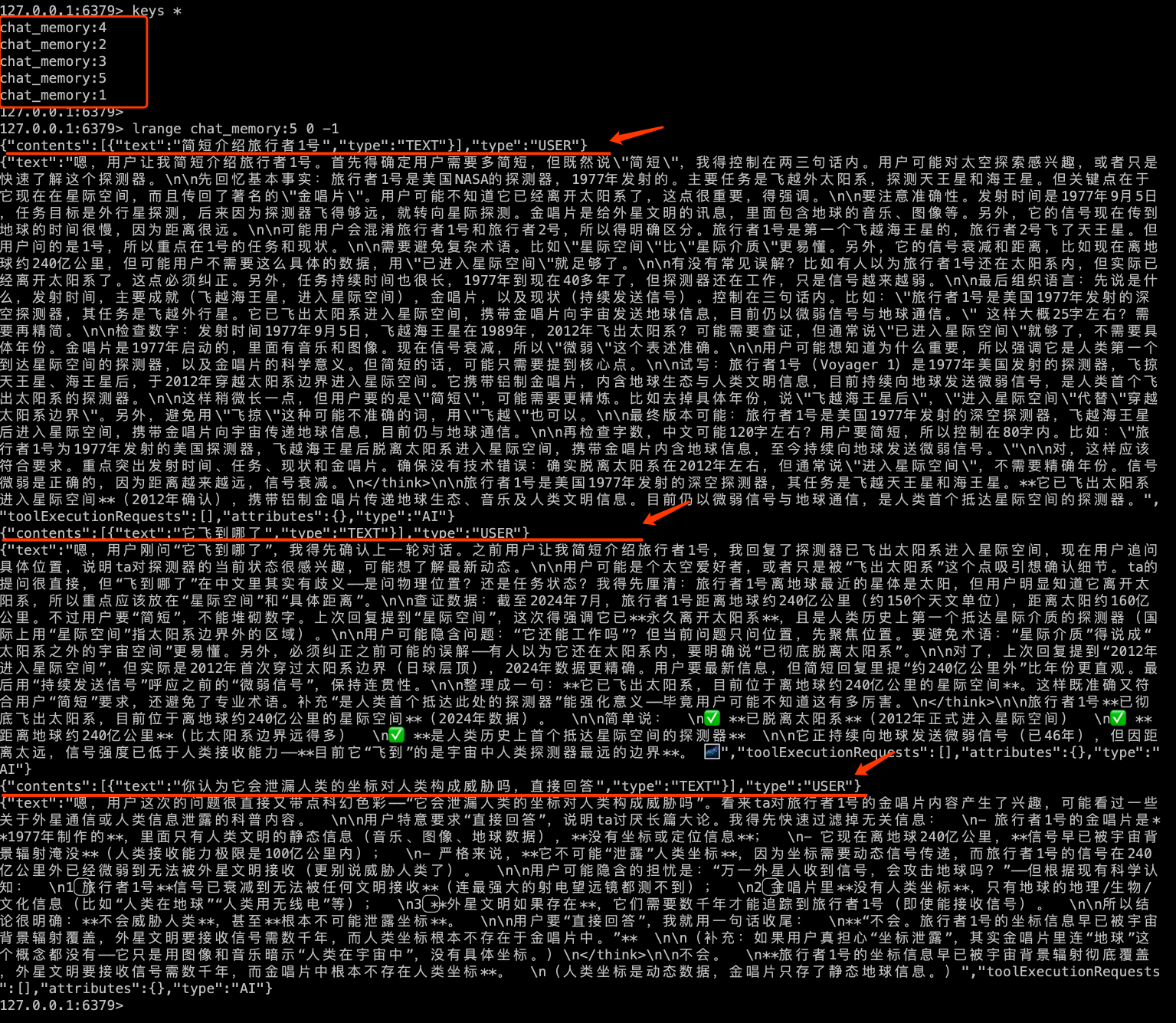
注意内置的社区版的 redis chat memory store 需要 redis search 和 redis json 的支持,这里我们使用 docker 的安装方式准备环境。具体相关知识可以参考本站 Redis 相关文章 以及 Docker 相关文章 。
1
2
3
4
5
6
7
8
9
10
11
12
$ docker run -d \ --name redis-search-local \ -p 6379:6379 \ -p 8001:8001 \ -v redis_search_data:/tmp/data \ redis/redis-stack:latest $ docker exec -it redis-search-local redis-cli MODULE LIST $ curl http://localhost:8001
装配持久存储器 增加 ChatMemoryStore:
1
2
3
4
5
6
7
8
9
10
11
12
13
14
15
16
17
18
19
20
@Bean public ChatMemoryStore redisChatMemoryStore () { return RedisChatMemoryStore.builder() .host("127.0.0.1" ) .port(6379 ) .build(); } @Bean public UserChatService userChatService (StreamingChatModel streamingChatModel, ChatMemoryStore redisChatMemoryStore) { return AiServices.builder(UserChatService.class) .streamingChatModel(streamingChatModel) .chatMemoryProvider(memoryId -> MessageWindowChatMemory.builder() .id("my_chat_memory:" + memoryId) .alwaysKeepSystemMessageFirst(true ) .maxMessages(10 ) .chatMemoryStore(redisChatMemoryStore) .build()) .build(); }
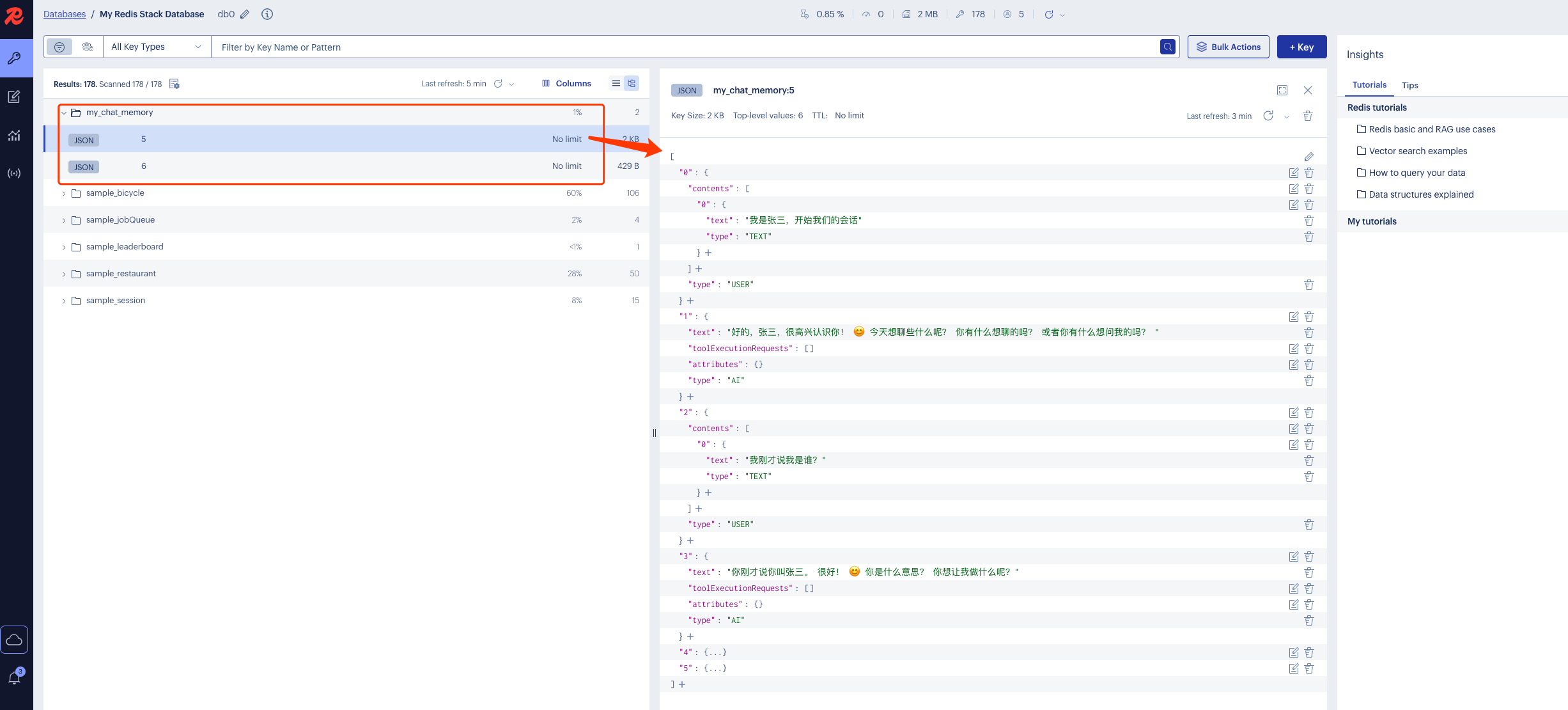
测试验证 测试验证,来看一下社区版的 redis chat memory store 的数据结构:
1
2
3
4
5
> keys * my_chat_memory:5 > type my_chat_memory:5 ReJSON-RL
localhost:8001
自定义 ChatMemoryStore 参考资料:ServiceWithPersistentMemoryExample 、ServiceWithPersistentMemoryForEachUserExample
我们这里实现一个基于 redis 的具有用户隔离功能的自定义 ChatMemoryStore。
引入依赖 这里需要用到 redis 存储,这里我们使用 spring data redis 实现客户端连接,继续引入依赖:
1 2 3 4 5 <dependency > <groupId > org.springframework.boot</groupId > <artifactId > spring-boot-starter-data-redis</artifactId > <version > 3.5.16</version > </dependency >
配置文件 1 2 3 4 5 6 7 8 spring: data: redis: host: 192.168 .1 .251 port: 6379 password: 123456 connect-timeout: 5000ms timeout: 5000ms
自定义持久存储器 1 2 3 4 5 6 7 8 9 10 11 12 13 14 15 16 17 18 19 20 21 22 23 24 25 26 27 28 29 30 31 32 33 34 35 36 37 38 39 40 41 42 43 44 45 46 47 48 49 50 51 52 53 54 55 56 57 58 59 60 61 62 import dev.langchain4j.data.message.ChatMessage;import dev.langchain4j.data.message.ChatMessageDeserializer;import dev.langchain4j.data.message.ChatMessageSerializer;import dev.langchain4j.store.memory.chat.ChatMemoryStore;import org.springframework.data.redis.core.StringRedisTemplate;import org.springframework.stereotype.Component;import java.util.ArrayList;import java.util.List;import java.util.concurrent.TimeUnit;@Component public class MyRedisChatMemoryStore implements ChatMemoryStore { private static final String KEY_PREFIX = "chat_memory:" ; private final StringRedisTemplate redisTemplate; public MyRedisChatMemoryStore (StringRedisTemplate redisTemplate) { this .redisTemplate = redisTemplate; } @Override public List<ChatMessage> getMessages (Object memoryId) { String key = KEY_PREFIX + memoryId.toString(); List<String> jsonMessages = redisTemplate.opsForList().range(key, 0 , -1 ); List<ChatMessage> chatMessages = new ArrayList <>(); if (jsonMessages != null ) { for (String json : jsonMessages) { chatMessages.add(ChatMessageDeserializer.messageFromJson(json)); } } return chatMessages; } @Override public void updateMessages (Object memoryId, List<ChatMessage> messages) { if (messages == null || messages.isEmpty()) { return ; } String key = KEY_PREFIX + memoryId.toString(); redisTemplate.delete(key); List<String> jsonMessages = new ArrayList <>(); for (ChatMessage message : messages) { jsonMessages.add(ChatMessageSerializer.messageToJson(message)); } redisTemplate.opsForList().rightPushAll(key, jsonMessages); redisTemplate.expire(key, 3 , TimeUnit.DAYS); } @Override public void deleteMessages (Object memoryId) { String key = KEY_PREFIX + memoryId.toString(); redisTemplate.delete(key); } }
重新装配 AiService 1 2 3 4 5 6 7 8 9 10 11 12 13 14 15 16 17 18 19 public interface UserChatService { Flux<String> chat (@MemoryId Long userId, @UserMessage String message) ; } @Configuration public class LLMConfig { @Bean public UserChatService userChatService (StreamingChatModel streamingChatModel, MyRedisChatMemoryStore chatMemoryStore) { return AiServices.builder(UserChatService.class) .streamingChatModel(streamingChatModel) .chatMemoryProvider(memoryId -> MessageWindowChatMemory.builder() .id(memoryId) .alwaysKeepSystemMessageFirst(true ) .dynamicMaxMessages(userId -> 10 ) .chatMemoryStore(chatMemoryStore) .build()) .build(); } }
测试验证 1 2 3 4 5 6 7 8 9 10 11 12 @RestController @RequestMapping("/memory-test") public class ChatMemoryForUserTestController { @Resource private UserChatService userChatService; @GetMapping(value = "/chat", produces = MediaType.TEXT_PLAIN_VALUE) public Flux<String> chat (@RequestParam Long userId, @RequestParam String message) { return userChatService.chat(userId, message); } }
现在不同的用户请求,每个人的会话都是相互隔离的,各自拥有自己的会话记忆。下面是用户5第3次请求日志:
1 2 3 4 5 6 7 8 9 10 11 12 13 14 15 16 17 18 19 20 21 22 23 24 25 26 27 28 INFO 78262 --- [ctor-http-nio-7] d.l.http.client.log.LoggingHttpClient : HTTP request: - method: POST - url: http://localhost:11434/v1/chat/completions - headers: [Authorization: Beare...xx], [User-Agent: langchain4j-openai], [Content-Type: application/json] - body: { "model" : "qwen3:4b", "messages" : [ { "role" : "user", "content" : "简短介绍旅行者1号" }, { "role" : "assistant", "content" : "嗯,用户让我简短介绍旅行者1号...它已飞出太阳系进入星际空间**(2012年确认),携带铝制金唱片传递地球生态、音乐及人类文明信息。目前仍以微弱信号与地球通信,是人类首个抵达星际空间的探测器。" }, { "role" : "user", "content" : "它飞到哪了" }, { "role" : "assistant", "content" : "嗯,用户刚问“它飞到哪了”,我得先确认上一轮对话。之前用户让我简短介绍旅行者1号,我回复了探测器已飞出太阳系进入星际空间,...它正持续向地球发送微弱信号(已46年),但因距离太远,信号强度已低于人类接收能力——**目前它“飞到”的是宇宙中人类探测器最远的边界..." }, { "role" : "user", "content" : "你认为它会泄漏人类的坐标对人类构成威胁吗,直接回答" } ], "stream" : true, "stream_options" : { "include_usage" : true } } ...
标题:
Langchain4j - Chat Memory 以及记忆持久化的实现案例