在实际环境中,光有高并发是不够的,系统的稳定性才是王道。高性能后端系统在上线前必须具备完备的防御工事。这其中包括限流与熔断、链路追踪、资源治理等等。本文我们将介绍这些 “防御工事” 的实现。
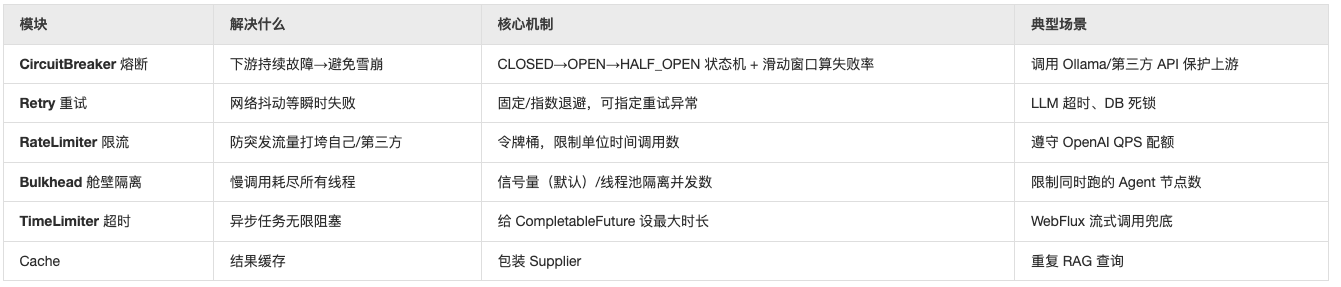
限流与熔断 Resilience4j 简介 Resilience4j 是 Java 8+ 的轻量级容错(Fault Tolerance)库,专为微服务/高并发场景设计,用来给 “不稳定调用”(远程 API、DB、LLM、第三方服务)加弹性保护,是 Netflix Hystrix 停止维护后的官方推荐替代。
轻量无重依赖:核心只依赖 Vavr/SLF4J,不绑 Archaius/Netty,Spring Boot 3 直接集成;Resilience4j 2.x 要求 Java 17。
装饰器模式:把容错逻辑”包”在业务函数外,不侵入代码。
模块化:熔断/限流/隔离各是独立 jar,只用需要的,不引入全家桶。
Registry 管理:每个实例独立配置,支持 Micrometer/Prometheus 埋点。
典型的案例 使用 Resilience4j 对 “异步调用” 链进行增强。目标如下:
一个实际的场景是:比如业务系统获取薪资任务调用的是一个外部的薪资中心 API。这个 API 如果每分钟只允许你调 100 次(超额会报错),需要如何在你的虚拟线程代码中加入一个限流器 (RateLimiter)来防止触发 API 的封禁。为了实现这一点,我们需要给它加三层 “防弹衣”:
RateLimiter(限流器): 限制请求频率(例如:每秒最多 50 次)。
CircuitBreaker(断路器):当失败率超过 50% 时,打开断路器,直接切断请求 10 秒(快速失败,保护后端)。
Retry(重试):对于网络抖动导致的异常,自动重试 3 次,间隔 500ms。
舱壁模式 (Bulkhead):为核心业务(用户、订单)和边缘业务(推荐)分配独立的限流窗口。
首先,引入依赖,以及设置必要的配置:
1 2 3 4 5 6 7 8 9 10 11 12 13 14 15 16 17 18 19 20 21 22 <dependencies > <dependency > <groupId > io.github.resilience4j</groupId > <artifactId > resilience4j-all</artifactId > <version > 2.2.0</version > </dependency > <dependency > <groupId > org.projectlombok</groupId > <artifactId > lombok</artifactId > <version > 1.18.44</version > </dependency > <dependency > <groupId > org.slf4j</groupId > <artifactId > slf4j-api</artifactId > <version > 2.0.18</version > </dependency > <dependency > <groupId > ch.qos.logback</groupId > <artifactId > logback-classic</artifactId > <version > 1.5.34</version > </dependency > </dependencies >
resources/logback.xml:
1
2
3
4
5
6
7
8
9
10
11
12
13
14
15
16
17
18
<?xml version="1.0" encoding="UTF-8" ?> <configuration > <property name ="LOG_PATTERN" value ="%d{HH:mm:ss.SSS} [%thread] %-5level %logger{36} - %msg%n" /> <appender name ="CONSOLE" class ="ch.qos.logback.core.ConsoleAppender" > <encoder > <pattern > ${LOG_PATTERN}</pattern > </encoder > </appender > <root level ="INFO" > <appender-ref ref ="CONSOLE" /> </root > </configuration >
业务类和测试方法:
1
2
3
4
5
6
7
8
9
10
11
12
13
14
15
16
17
18
19
20
21
22
23
24
25
26
27
28
29
30
31
32
33
34
35
36
37
38
39
40
41
42
43
44
45
46
47
48
49
50
51
52
53
54
55
56
57
58
59
60
61
62
63
64
65
66
67
68
69
70
71
72
73
74
75
76
77
78
79
80
81
82
83
84
85
86
87
88
89
90
91
92
93
94
95
96
97
98
99
100
101
102
103
104
105
106
107
108
109
110
111
112
113
114
115
116
117
118
119
120
121
122
123
124
import io.github.resilience4j.bulkhead.Bulkhead;import io.github.resilience4j.bulkhead.BulkheadConfig;import io.github.resilience4j.circuitbreaker.CallNotPermittedException;import io.github.resilience4j.circuitbreaker.CircuitBreaker;import io.github.resilience4j.circuitbreaker.CircuitBreakerConfig;import io.github.resilience4j.decorators.Decorators;import io.github.resilience4j.ratelimiter.RateLimiter;import io.github.resilience4j.ratelimiter.RateLimiterConfig;import io.github.resilience4j.retry.Retry;import io.github.resilience4j.retry.RetryConfig;import lombok.extern.slf4j.Slf4j;import java.time.Duration;import java.util.List;import java.util.concurrent.ExecutorService;import java.util.concurrent.Executors;import java.util.concurrent.TimeUnit;import java.util.concurrent.atomic.AtomicInteger;import java.util.function.Supplier;@Slf4j public class SalaryService { private final RateLimiter rateLimiter = RateLimiter.of("salaryService" , RateLimiterConfig.custom() .limitForPeriod(50 ) .limitRefreshPeriod(Duration.ofSeconds(1 )) .timeoutDuration(Duration.ofMillis(100 )) .build()); private final CircuitBreaker circuitBreaker = CircuitBreaker.of("salaryService" , CircuitBreakerConfig.custom() .failureRateThreshold(50 ) .waitDurationInOpenState(Duration.ofSeconds(10 )) .slidingWindowSize(10 ) .build()); private final Retry retry = Retry.of("salaryService" , RetryConfig.custom() .maxAttempts(3 ) .waitDuration(Duration.ofMillis(500 )) .build()); private final Bulkhead salaryBulkhead = Bulkhead.of("salaryService" , BulkheadConfig.custom() .maxConcurrentCalls(100 ) .maxWaitDuration(Duration.ofMillis(50 )) .build()); public Double callSalaryApi (Long empId) { Supplier<Double> supplier = () -> fetchSalary(empId); return Decorators.ofSupplier(supplier) .withBulkhead(salaryBulkhead) .withRetry(retry) .withCircuitBreaker(circuitBreaker) .withRateLimiter(rateLimiter) .withFallback(List.of(CallNotPermittedException.class, Exception.class), ex -> { System.err.println("API 降级处理: " + ex.getMessage()); return 0.0 ; }) .get(); } public Double fetchSalary (Long empId) { try { TimeUnit.MILLISECONDS.sleep(100 ); } catch (InterruptedException e) { throw new RuntimeException (e); } log.info("execute fetchSalary..." ); return 50000.0 ; } public static void main (String[] args) { SalaryService salaryService = new SalaryService (); try (ExecutorService executor = Executors.newVirtualThreadPerTaskExecutor()) { AtomicInteger successCount = new AtomicInteger (0 ); AtomicInteger fallbackCount = new AtomicInteger (0 ); int totalRequests = 60 ; for (int i = 0 ; i < totalRequests; i++) { executor.submit(() -> { Double result = salaryService.callSalaryApi(1L ); if (result == 0.0 ) { fallbackCount.incrementAndGet(); } else { successCount.incrementAndGet(); } }); } executor.shutdown(); executor.awaitTermination(5 , TimeUnit.SECONDS); System.out.println("成功次数: " + successCount.get()); System.out.println("降级次数: " + fallbackCount.get()); } catch (InterruptedException e) { throw new RuntimeException (e); } } }
控制台输出:
1
2
3
4
5
6
7
8
9
10
11
12
13
14
15
16
17
18
14:04:53.623 [virtual-40] INFO demo01.SalaryService - execute fetchSalary... 14:04:53.623 [virtual-34] INFO demo01.SalaryService - execute fetchSalary... 14:04:53.628 [virtual-41] INFO demo01.SalaryService - execute fetchSalary... ... 14:04:53.639 [virtual-81] INFO demo01.SalaryService - execute fetchSalary... 14:04:53.641 [virtual-28] INFO demo01.SalaryService - execute fetchSalary... 成功次数: 50 降级次数: 10 API 降级处理: RateLimiter 'salaryService' does not permit further calls API 降级处理: RateLimiter 'salaryService' does not permit further calls API 降级处理: RateLimiter 'salaryService' does not permit further calls API 降级处理: RateLimiter 'salaryService' does not permit further calls API 降级处理: RateLimiter 'salaryService' does not permit further calls API 降级处理: RateLimiter 'salaryService' does not permit further calls API 降级处理: RateLimiter 'salaryService' does not permit further calls API 降级处理: RateLimiter 'salaryService' does not permit further calls API 降级处理: RateLimiter 'salaryService' does not permit further calls API 降级处理: RateLimiter 'salaryService' does not permit further calls
集成到 spring 依赖配置变成:
1 2 3 4 5 6 7 8 9 10 11 12 13 14 15 16 17 18 19 20 21 22 23 24 25 26 27 28 29 30 31 32 33 34 35 36 37 38 <dependencies > <dependency > <groupId > org.springframework.boot</groupId > <artifactId > spring-boot-starter-web</artifactId > <version > 3.5.16</version > </dependency > <dependency > <groupId > org.springframework.boot</groupId > <artifactId > spring-boot-starter-aop</artifactId > <version > 3.5.16</version > </dependency > <dependency > <groupId > org.springframework.boot</groupId > <artifactId > spring-boot-starter-test</artifactId > <version > 3.5.16</version > <scope > test</scope > </dependency > <dependency > <groupId > io.github.resilience4j</groupId > <artifactId > resilience4j-spring-boot3</artifactId > <version > 2.2.0</version > </dependency > <dependency > <groupId > org.slf4j</groupId > <artifactId > slf4j-api</artifactId > <version > 2.0.18</version > </dependency > <dependency > <groupId > org.projectlombok</groupId > <artifactId > lombok</artifactId > <version > 1.18.44</version > </dependency > </dependencies >
application.yml
1
2
3
4
5
6
7
8
9
10
11
12
13
14
15
16
17
18
resilience4j: circuitbreaker: instances: salaryService: failureRateThreshold: 50 waitDurationInOpenState: 10s slidingWindowSize: 10 ratelimiter: instances: salaryService: limitForPeriod: 50 limitRefreshPeriod: 1s timeoutDuration: 100ms bulkhead: instances: salaryService: maxConcurrentCalls: 10 maxWaitDuration: 50ms
业务类:
1
2
3
4
5
6
7
8
9
10
11
12
13
14
15
16
17
18
19
20
21
22
23
24
25
26
27
28
29
30
31
32
33
34
35
import io.github.resilience4j.bulkhead.annotation.Bulkhead;import io.github.resilience4j.circuitbreaker.annotation.CircuitBreaker;import io.github.resilience4j.ratelimiter.annotation.RateLimiter;import lombok.extern.slf4j.Slf4j;import org.springframework.stereotype.Service;import java.util.concurrent.TimeUnit;@Slf4j @Service public class SalaryService { @CircuitBreaker(name = "salaryService", fallbackMethod = "fallback") @RateLimiter(name = "salaryService") @Bulkhead(name = "salaryService") public Double fetchSalary (Long empId) { try { TimeUnit.MILLISECONDS.sleep(100 ); } catch (InterruptedException e) { throw new RuntimeException (e); } log.info("execute fetchSalary..." ); return 50000.0 ; } public Double fallback (Long empId, Throwable t) { log.error("API 降级处理: {}" , t.getMessage()); return 0.0 ; } }
测试类:
1
2
3
4
5
6
7
8
9
10
11
12
13
14
15
16
17
18
19
20
21
22
23
24
25
26
27
28
29
30
31
32
33
34
35
36
37
38
@SpringBootTest(classes = App.class) public class SalaryServiceTest { @Resource private SalaryService salaryService; @Test public void test01 () { try (ExecutorService executor = Executors.newVirtualThreadPerTaskExecutor()) { AtomicInteger successCount = new AtomicInteger (0 ); AtomicInteger fallbackCount = new AtomicInteger (0 ); int totalRequests = 60 ; for (int i = 0 ; i < totalRequests; i++) { executor.submit(() -> { Double result = salaryService.fetchSalary(1L ); if (result == 0.0 ) { fallbackCount.incrementAndGet(); } else { successCount.incrementAndGet(); } }); } executor.shutdown(); executor.awaitTermination(5 , TimeUnit.SECONDS); System.out.println("成功次数: " + successCount.get()); System.out.println("降级次数: " + fallbackCount.get()); } catch (InterruptedException e) { throw new RuntimeException (e); } } }
链路追踪 MDC 简介 在异步多线程环境中,最痛苦的是 “日志散落在各处,找不到请求的起点”。接下来我们引入 MDC (Mapped Diagnostic Context)。目标是在 CompletableFuture 或 VirtualThread 任务启动时,将 TraceID 从主线程传递到异步线程。确保无论任务怎么切换,日志里都能带上同一个 TraceID。这是排查线上异步 Bug 的唯一方案。
MDC 是 SLF4J (Simple Logging Facade for Java) 的一部分,而 SLF4J 又是所有 Java 项目几乎必装的日志门面。只要你的项目中有 slf4j-api 这个包,你就已经拥有了 org.slf4j.MDC 类。虽然 MDC 本身是 slf4j-api 的一部分,但要让它真正生效并显示在日志中,你需要一个具体的日志实现框架,比如 Logback 或者 Logback(spring 自带)。
1 2 3 4 5 6 7 8 9 10 <dependency > <groupId > org.slf4j</groupId > <artifactId > slf4j-api</artifactId > <version > 2.0.18</version > </dependency > <dependency > <groupId > org.projectlombok</groupId > <artifactId > lombok</artifactId > <version > 1.18.44</version > </dependency >
具体的实现 首先,日志配置需要显式指定 traceId:
1
2
3
4
5
6
7
8
9
10
11
12
13
14
15
16
17
18
<?xml version="1.0" encoding="UTF-8" ?> <configuration > <property name ="LOG_PATTERN" value ="%d{yyyy-MM-dd HH:mm:ss.SSS} [%thread] %-5level %logger{36} - [TraceID: %X{traceId}] - %msg%n" /> <appender name ="CONSOLE" class ="ch.qos.logback.core.ConsoleAppender" > <encoder > <pattern > ${LOG_PATTERN}</pattern > </encoder > </appender > <root level ="INFO" > <appender-ref ref ="CONSOLE" /> </root > </configuration >
要实现 “全链路 TraceID”,我们采用装饰器模式(Decorator Pattern),在任务提交时手动捕获主线程的 MDC 并注入到任务中。
1
2
3
4
5
6
7
8
9
10
11
12
13
14
15
16
17
18
19
20
21
22
23
24
25
@Slf4j @Service public class UserService { private final ThreadPoolExecutor executor = new ThreadPoolExecutor (4 , 4 , 60L , TimeUnit.SECONDS, new LinkedBlockingQueue <>()); public void executeAsyncFunc (Runnable task) { log.info("executeAsyncFunc 开始执行..." ); Map<String, String> context = MDC.getCopyOfContextMap(); executor.submit(() -> { try { MDC.setContextMap(context); log.info("mdc setContextMap..." ); task.run(); } finally { log.info("mdc clear..." ); MDC.clear(); } }); } }
测试类:
1
2
3
4
5
6
7
8
9
10
11
12
13
14
15
16
17
18
@Slf4j @SpringBootTest(classes = App.class) public class UserServiceTest { @Resource private UserService userService; @Test public void test01 () { MDC.put("traceId" , UUID.randomUUID().toString().replace("-" , "" )); try { userService.executeAsyncFunc(() -> log.info("测试方法开始执行" )); } finally { MDC.clear(); } } }
日志输出:
1
2
3
4
2023-11-15 15:18:10.905 [main] INFO demo01.service.UserService - [TraceID: dd74db8d0c0449a192642f5f3512233f] - executeAsyncFunc 开始执行... 2023-11-15 15:18:10.906 [pool-2-thread-1] INFO demo01.service.UserService - [TraceID: dd74db8d0c0449a192642f5f3512233f] - mdc setContextMap... 2023-11-15 15:18:10.906 [pool-2-thread-1] INFO service.UserServiceTest - [TraceID: dd74db8d0c0449a192642f5f3512233f] - 测试方法开始执行 2023-11-15 15:18:10.906 [pool-2-thread-1] INFO demo01.service.UserService - [TraceID: dd74db8d0c0449a192642f5f3512233f] - mdc clear...
有限资源的治理 我们知道,即使有虚拟线程,数据库连接池也不是无限的。 我们可以在使用 Executors.newVirtualThreadPerTaskExecutor() 的同时,结合 Semaphore 对特定高风险资源(如:调用第三方支付接口、慢 SQL 查询)进行 “并发度限流”。
在虚拟线程场景下,Semaphore 是控制 “资源并发访问” 的最轻量级工具。它不同于 RateLimiter(控制频率),它是直接控制 “在途任务数”。你可以将 Semaphore 视为 “连接池的守护门卫”。
1
2
3
4
5
6
7
8
9
10
11
12
13
14
15
16
17
18
19
20
21
22
23
24
25
26
27
28
29
30
31
32
33
import lombok.extern.slf4j.Slf4j;import java.util.concurrent.ExecutorService;import java.util.concurrent.Executors;import java.util.concurrent.Semaphore;@Slf4j public class DatabaseAccessLayer { private final Semaphore dbSemaphore = new Semaphore (50 ); private final ExecutorService vtExecutor = Executors.newVirtualThreadPerTaskExecutor(); public void executeQuery (String sql) { vtExecutor.submit(() -> { try { dbSemaphore.acquire(); try { log.info("Executing slow SQL..." ); } finally { dbSemaphore.release(); } } catch (InterruptedException e) { Thread.currentThread().interrupt(); } }); } }
这样,即使你的 Web 层通过虚拟线程接收了 5000 个请求,这个 Semaphore 会确保只有 50 个请求能真正触达数据库,其余的 4950 个请求会被阻塞在 acquire() 这一步,直到前面的任务完成。如果没有这个限制,当 SQL 变慢时,所有虚拟线程都会挂在数据库连接上,连接池耗尽,随后所有业务(包括那些简单的查询)都会因为拿不到连接而超时。你还可以使用 dbSemaphore.tryAcquire(500, TimeUnit.MILLISECONDS)。如果超过 500ms 还没拿到许可,直接抛出 “系统繁忙” 异常,而不是让用户无限等待。
如果想用 Resilience4j 来管理数据库访问,可以这样配置:
1
2
3
4
5
6
resilience4j: bulkhead: instances: dbQuery: maxConcurrentCalls: 50 maxWaitDuration: 500ms
然后在代码中:
1
2
3
4
@Bulkhead(name = "dbQuery", type = Bulkhead.Type.SEMAPHORE) public void performSlowQuery () { }
标题:
提升高并发系统鲁棒性三件套 - Resilience4j、MDC、Semaphore