EchoServer 案例
服务端的实现
NettyEchoServer:功能极其简单,服务端读取客户端输入的数据,然后将数据直接回显到控制台。
1
2
3
4
5
6
7
8
9
10
11
12
13
14
15
16
17
18
19
20
21
22
23
24
25
26
27
28
29
30
31
32
33
34
35
36
37
38
39
40
41
42
43
44
45
46
47
48
49
50
51
52
53
54
55
56
57
58
59
60
61
62
63
64
65
66
67
68
69
70
71
72
73
74
75
76
77
78
79
80
81
82
83
84
85
86
87
88
89
90
91
92
93
94
95
96
97
98
99
100
101
102
103
104
105
106
107
108
109
110
111
112
113
114
115
116
117
118
119
120
121
122
123
124
125
126
127
128
129
130
131
132
133
134
135
136
137
138
139
140
141
142
| import io.netty.bootstrap.ServerBootstrap;
import io.netty.buffer.ByteBuf;
import io.netty.channel.*;
import io.netty.channel.nio.NioIoHandler;
import io.netty.channel.socket.SocketChannel;
import io.netty.channel.socket.nio.NioServerSocketChannel;
import java.net.InetSocketAddress;
import java.nio.charset.StandardCharsets;
public class NettyEchoServer {
private final int port;
ServerBootstrap b = new ServerBootstrap();
public NettyEchoServer(int port) {
this.port = port;
}
public void runServer() {
EventLoopGroup bossLoopGroup = new MultiThreadIoEventLoopGroup(1, NioIoHandler.newFactory());
EventLoopGroup workerLoopGroup = new MultiThreadIoEventLoopGroup(NioIoHandler.newFactory());
try {
b.group(bossLoopGroup, workerLoopGroup);
b.channel(NioServerSocketChannel.class);
b.localAddress(new InetSocketAddress(port));
b.option(ChannelOption.SO_BACKLOG, 128)
.childOption(ChannelOption.SO_KEEPALIVE, true)
.childOption(ChannelOption.TCP_NODELAY, true);
b.childHandler(new ChannelInitializer<SocketChannel>() {
@Override
protected void initChannel(SocketChannel ch) {
ch.pipeline().addLast(NettyEchoServerHandler.INSTANCE);
}
});
ChannelFuture f = b.bind().sync();
System.out.println("Echo 服务器启动成功,监听端口:" + port);
f.channel().closeFuture().sync();
} catch (InterruptedException e) {
e.printStackTrace();
} finally {
bossLoopGroup.shutdownGracefully();
workerLoopGroup.shutdownGracefully();
}
}
@ChannelHandler.Sharable
static class NettyEchoServerHandler extends ChannelInboundHandlerAdapter {
public static final NettyEchoServerHandler INSTANCE = new NettyEchoServerHandler();
@Override
public void channelRead(ChannelHandlerContext ctx, Object msg) {
ByteBuf in = (ByteBuf) msg;
System.out.println("msg type: " + (in.hasArray() ? "堆内存" : "直接内存"));
int len = in.readableBytes();
byte[] arr = new byte[len];
in.getBytes(0, arr);
System.out.println("server received: " + new String(arr, StandardCharsets.UTF_8));
System.out.println("写回前,msg.refCnt:" + in.refCnt());
ChannelFuture f = ctx.writeAndFlush(msg);
f.addListener((ChannelFuture future) -> {
System.out.println("写回任务状态:" + (future.isSuccess() ? "成功\n" : "失败\n"));
});
}
@Override
public void exceptionCaught(ChannelHandlerContext ctx, Throwable cause) {
cause.printStackTrace();
ctx.close();
}
}
public static void main(String[] args) {
new NettyEchoServer(9000).runServer();
}
}
|
客户端的实现
NettyEchoClient
1
2
3
4
5
6
7
8
9
10
11
12
13
14
15
16
17
18
19
20
21
22
23
24
25
26
27
28
29
30
31
32
33
34
35
36
37
38
39
40
41
42
43
44
45
46
47
48
49
50
51
52
53
54
55
56
57
58
59
60
61
62
63
64
65
66
67
68
69
70
71
72
73
74
75
76
77
78
79
80
81
82
83
84
85
86
87
88
89
90
91
92
93
94
95
96
97
98
99
100
101
102
103
104
105
| import io.netty.bootstrap.Bootstrap;
import io.netty.buffer.ByteBuf;
import io.netty.buffer.PooledByteBufAllocator;
import io.netty.channel.*;
import io.netty.channel.nio.NioIoHandler;
import io.netty.channel.socket.SocketChannel;
import io.netty.channel.socket.nio.NioSocketChannel;
import java.nio.charset.StandardCharsets;
import java.util.Scanner;
public class NettyEchoClient {
private final int serverPort;
private final String serverIp;
Bootstrap b = new Bootstrap();
public NettyEchoClient(String ip, int port) {
this.serverPort = port;
this.serverIp = ip;
}
public void runClient() {
EventLoopGroup workerLoopGroup = new MultiThreadIoEventLoopGroup(NioIoHandler.newFactory());
try {
b.group(workerLoopGroup);
b.channel(NioSocketChannel.class);
b.remoteAddress(serverIp, serverPort);
b.option(ChannelOption.ALLOCATOR, PooledByteBufAllocator.DEFAULT);
b.handler(new ChannelInitializer<SocketChannel>() {
protected void initChannel(SocketChannel ch) {
ch.pipeline().addLast(NettyEchoClientHandler.INSTANCE);
}
});
ChannelFuture future = b.connect();
future.addListener((ChannelFuture futureListener) -> {
if (futureListener.isSuccess()) {
System.out.println("EchoClient客户端连接成功!");
} else {
System.out.println("EchoClient客户端连接失败!");
}
});
future.sync();
Channel channel = future.channel();
Scanner scanner = new Scanner(System.in);
System.out.println("请输入发送内容:");
while (scanner.hasNext()) {
String next = scanner.next();
byte[] bytes = next.getBytes(StandardCharsets.UTF_8);
ByteBuf buffer = channel.alloc().buffer();
buffer.writeBytes(bytes);
channel.writeAndFlush(buffer);
System.out.println("请输入发送内容:");
}
} catch (Exception e) {
e.printStackTrace();
} finally {
workerLoopGroup.shutdownGracefully();
}
}
@ChannelHandler.Sharable
static class NettyEchoClientHandler extends ChannelInboundHandlerAdapter {
public static final NettyEchoClientHandler INSTANCE = new NettyEchoClientHandler();
@Override
public void channelRead(ChannelHandlerContext ctx, Object msg) {
ByteBuf byteBuf = (ByteBuf) msg;
int len = byteBuf.readableBytes();
byte[] arr = new byte[len];
byteBuf.getBytes(0, arr);
System.out.println("client received: " + new String(arr, StandardCharsets.UTF_8));
byteBuf.release();
}
}
public static void main(String[] args) {
NettyEchoClient nettyEchoClient = new NettyEchoClient("127.0.0.1", 9000);
nettyEchoClient.runClient();
}
}
|
半包问题的复现
问题演示
改造一下前面的 NettyEchoClient 实例,通过循环的方式向 NettyEchoServer 回显服务器写入大量的 ByteBuf,然后看看实际的服务器响应结果。注意:服务器类不需要改造,直接使用之前的回显服务器即可。改造好的客户端类——叫 NettyDumpSendClient。在客户端建立连接成功之后,使用一个 for 循环不断通过通道向服务端发送ByteBuf, 一直写到1000次,这些ByteBuf的内容相同,都是相同的字符串内容。
1
2
3
4
5
6
7
8
9
10
11
12
13
14
15
16
17
18
19
20
21
22
23
24
25
26
27
28
29
30
31
32
33
34
35
36
37
38
39
40
41
42
43
44
45
46
47
48
49
50
51
52
53
54
55
56
57
58
59
60
61
62
63
64
65
66
67
68
69
70
71
72
73
74
75
76
77
78
79
80
81
82
83
84
| public class NettyDumpSendClient {
private final String serverIp;
private final int serverPort;
Bootstrap b = new Bootstrap();
public NettyDumpSendClient(String ip, int port) {
this.serverPort = port;
this.serverIp = ip;
}
public void runClient() {
EventLoopGroup workerLoopGroup = new MultiThreadIoEventLoopGroup(NioIoHandler.newFactory());
try {
b.group(workerLoopGroup);
b.channel(NioSocketChannel.class);
b.remoteAddress(serverIp, serverPort);
b.option(ChannelOption.ALLOCATOR, PooledByteBufAllocator.DEFAULT);
b.handler(new ChannelInitializer<NioSocketChannel>() {
@Override
protected void initChannel(NioSocketChannel ch) {
ch.pipeline().addLast(NettyEchoClientHandler.INSTANCE);
}
});
ChannelFuture future = b.connect();
future.addListener((ChannelFuture futureListener) -> {
if (futureListener.isSuccess()) {
System.out.println("NettyDumpSendClient客户端连接成功!");
} else {
System.out.println("NettyDumpSendClient客户端连接失败!");
}
});
future.sync();
Channel channel = future.channel();
String content = "密涅瓦的猫头鹰在黄昏起飞。";
byte[] bytes = content.getBytes(StandardCharsets.UTF_8);
for (int i = 0; i < 1000; i++) {
ByteBuf buffer = channel.alloc().buffer();
buffer.writeBytes(bytes);
channel.writeAndFlush(buffer);
}
} catch (Exception e) {
e.printStackTrace();
} finally {
workerLoopGroup.shutdownGracefully();
}
}
@ChannelHandler.Sharable
static class NettyEchoClientHandler extends ChannelInboundHandlerAdapter {
public static final NettyEchoClient.NettyEchoClientHandler INSTANCE = new NettyEchoClient.NettyEchoClientHandler();
@Override
public void channelRead(ChannelHandlerContext ctx, Object msg) {
ByteBuf byteBuf = (ByteBuf) msg;
int len = byteBuf.readableBytes();
byte[] arr = new byte[len];
byteBuf.getBytes(0, arr);
System.out.println("client received: " + new String(arr, StandardCharsets.UTF_8));
byteBuf.release();
}
}
public static void main(String[] args) {
NettyDumpSendClient client = new NettyDumpSendClient("127.0.0.1", 9000);
client.runClient();
}
}
|
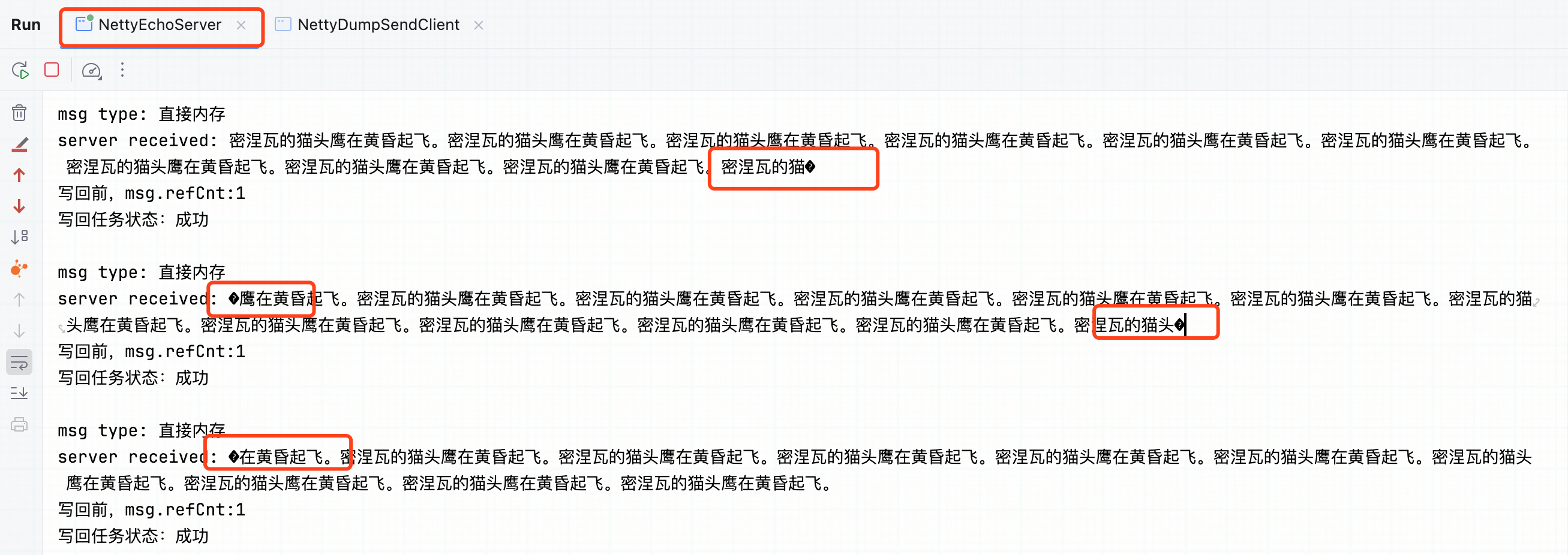
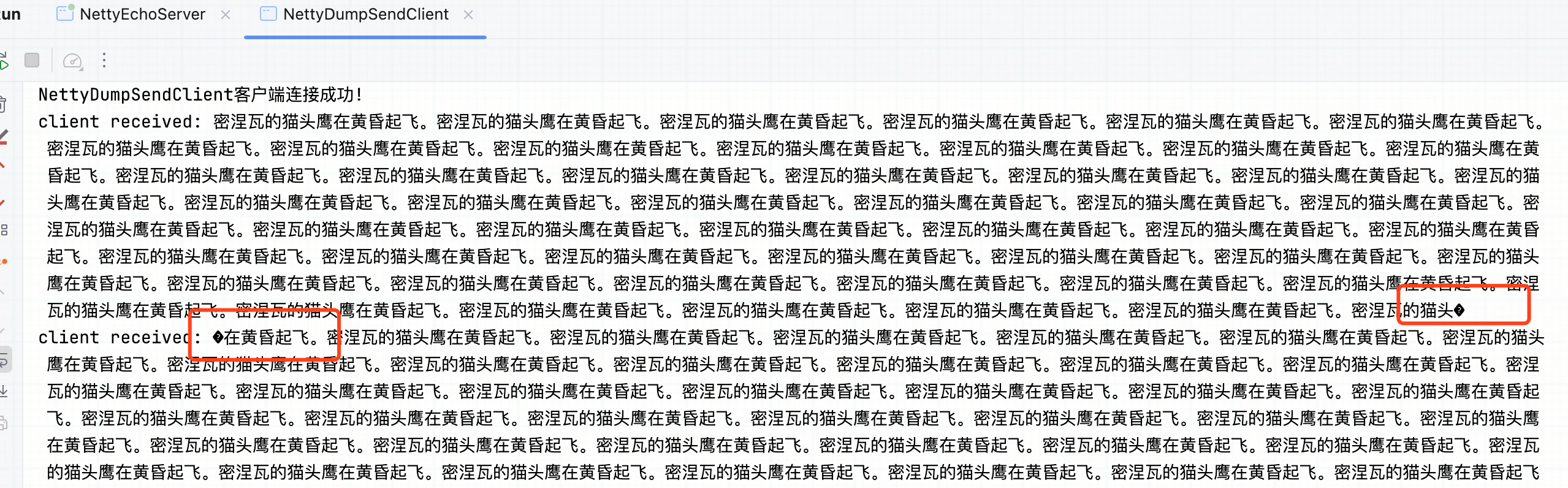
仔细观察服务端的控制台输出,可以看出存在三种类型的输出:
- 读到一个完整的客户端输入ByteBuf。
- 读到多个客户端的ByteBuf输入,但是“粘”在了一起。
- 读到部分ByteBuf的内容,并且有乱码。
除了观察服务端的输出之外,再仔细观察客户端的输出,可以看 到客户端也存在以上三种类型的输出。对应于第1种情况接收到的完整的ByteBuf,这里称为“全包”。 对应于第2种情况,多个发送端的输入ByteBuf“粘”在了一起,这里 称为“粘包”。对应于第3种情况,一个发送过来的ByteBuf被“拆 开”接收,接收端读取到一个破碎的包,这里称为“半包”。为了简单起见,也可以将“粘包”的情况看成特殊的“半包”。 “粘包”和“半包”可以统称为传输的“半包问题”。
半包问题的本质
半包问题包含了 “粘包” 和 “半包” 两种情况:
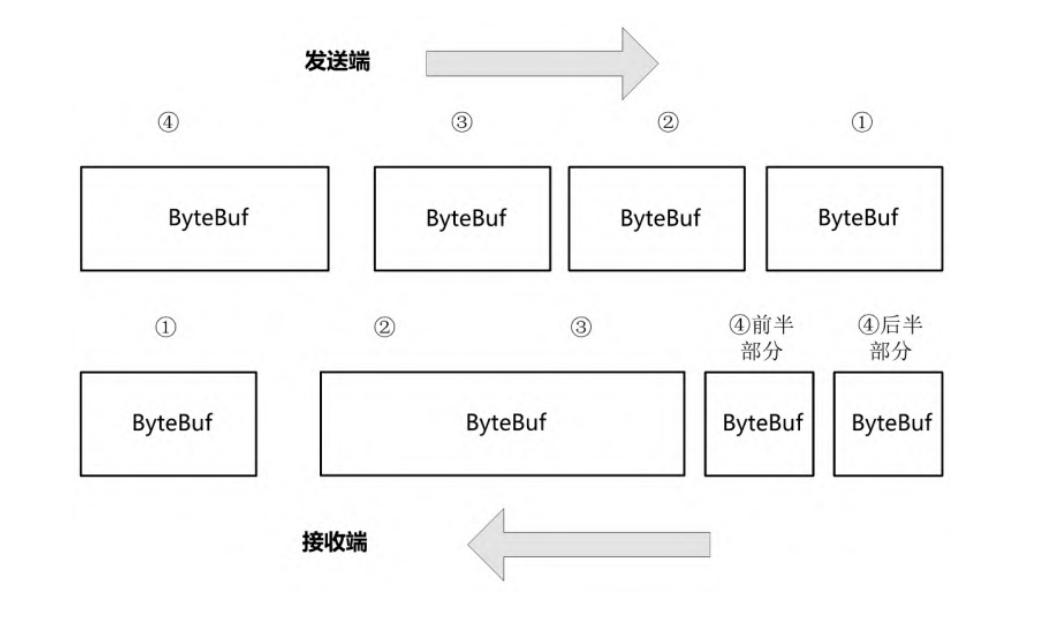
- 粘包:接收端(Receiver)收到一个ByteBuf,包含了发送端(Sender)的多个ByteBuf,发送端的多个ByteBuf在接收端“粘” 在了一起。
- 半包:Receiver将Sender的一个ByteBuf“拆”开了收,收 到多个破碎的包。换句话说,Receiver收到了Sender的一个ByteBuf的 一小部分。
无论是粘包还是半包都不是一次正常的ByteBuf缓存区接收,具体如图所示:
粘包和半包的来源得从操作系统底层说起。我们知道,底层网络是以二进制字节报文的形式来传输数据的。读数据的过程大致为:当IO可读时,Netty 会从底层网络将二进制数据读到ByteBuf缓冲区中,再交给Netty程序转成Java POJO对象。写数据的过程大致为:编码器将一个Java类型的数据转换成底层能够传输的二进制ByteBuf缓冲数据。
在发送端 Netty 的应用层进程缓冲区中,程序以 ByteBuf 为单位来发送数据,但是到了底层操作系统内核缓冲区,底层会按照协议的规范对数据包进行二次封装,封装成传输层的协议报文,再进行发送。 在接收端收到传输层的二进制包后,首先复制到内核缓冲区,Netty读取ByteBuf时才复制到应用的用户缓冲区。在接收端,当Netty程序将数据从内核缓冲区复制到用户缓冲区的 ByteBuf时,问题来了:
- 每次读取底层缓冲的数据容量是有限制的,当TCP内核缓冲区的数据包比较大时,可能会将一个底层包分成多次ByteBuf进行复制,进而造成用户缓冲区读到的是半包。
- 当TCP内核缓冲区的数据包比较小时,一次复制的是不止一个内核缓冲区包,进而会造成用户缓冲区读到粘包。
如何解决呢?基本思路是,在接收端,Netty程序需要根据自定义协议将读取到的进程缓冲区ByteBuf在应用层进行二次组装,重新组装应用层的数据包。接收端的这个过程通常也称为分包或者拆包。在Netty中分包的方法主要有以下两种:
- 可以自定义解码器分包器:基于 ByteToMessageDecoder 或者 ReplayingDecoder,定义自己的用户缓冲区分包器。
- 使用 Netty 内置的解码器。例如,可以使用 Netty 内置的 LengthFieldBasedFrameDecoder 自定义长度数据包解码器对用户缓冲区 ByteBuf 进行正确的分包。
自定义协议解决粘包和拆包问题
在 Netty 中,虽然官方提供了像 LengthFieldBasedFrameDecoder(自定义长度解码器)这样的现成组件,但为了彻底理解粘包、拆包的底层原理,最好的办法是自己设计一个最简版的“定长”或“长度字段”自定义协议。下面我们设计一个业界最常用的 [Length] + [Body](长度 + 内容) 自定义协议:
- 前 4 个字节(int):代表后面真实数据的字节长度。
- 后面的字节:代表真实的文本内容。
当 Netty 读取到前 4 个字节时,就知道后面还要等多少字节才是一条完整的消息。这样无论底层网络怎么粘包(多条合在一起)或拆包(一条碎成多次),我们的协议都能精准将其还原。
核心协议编解码器
由于服务端和客户端都需要对该协议进行编码和解码,我们直接编写两个通用的处理器。
编码器:MyProtocolEncoder。将要发送的字符串转换成 [4字节长度] + [真实数据] 的二进制流。
1
2
3
4
5
6
7
8
9
10
11
12
13
14
15
16
17
18
19
20
21
| import io.netty.buffer.ByteBuf;
import io.netty.channel.ChannelHandlerContext;
import io.netty.handler.codec.MessageToByteEncoder;
import java.nio.charset.StandardCharsets;
public class MyProtocolEncoder extends MessageToByteEncoder<String> {
@Override
protected void encode(ChannelHandlerContext channelHandlerContext, String msg, ByteBuf out) throws Exception {
if (msg == null) return;
byte[] bytes = msg.getBytes(StandardCharsets.UTF_8);
out.writeInt(bytes.length);
out.writeBytes(bytes);
}
}
|
解码器:MyProtocolDecoder。负责在网络流中精准裁剪出一条条完整的消息。
1
2
3
4
5
6
7
8
9
10
11
12
13
14
15
16
17
18
19
20
21
22
23
24
25
26
27
28
29
30
31
32
33
34
35
36
37
| import io.netty.buffer.ByteBuf;
import io.netty.channel.ChannelHandlerContext;
import io.netty.handler.codec.ByteToMessageDecoder;
import java.nio.charset.StandardCharsets;
import java.util.List;
public class MyProtocolDecoder extends ByteToMessageDecoder {
@Override
protected void decode(ChannelHandlerContext ctx, ByteBuf in, List<Object> out) throws Exception {
if (in.readableBytes() < 4) {
return;
}
in.markReaderIndex();
int length = in.readInt();
if (in.readableBytes() < length) {
in.resetReaderIndex();
return;
}
byte[] bytes = new byte[length];
in.readBytes(bytes);
String content = new String(bytes, StandardCharsets.UTF_8);
out.add(content);
}
}
|
服务端主类
ProtocolServer
1
2
3
4
5
6
7
8
9
10
11
12
13
14
15
16
17
18
19
20
21
22
23
24
25
26
27
28
29
30
31
32
33
34
35
36
37
38
39
40
| import io.netty.bootstrap.ServerBootstrap;
import io.netty.channel.*;
import io.netty.channel.nio.NioEventLoopGroup;
import io.netty.channel.socket.SocketChannel;
import io.netty.channel.socket.nio.NioServerSocketChannel;
public class ProtocolServer {
public static void main(String[] args) throws InterruptedException {
EventLoopGroup boss = new NioEventLoopGroup(1);
EventLoopGroup worker = new NioEventLoopGroup();
try {
ServerBootstrap b = new ServerBootstrap()
.group(boss, worker)
.channel(NioServerSocketChannel.class)
.childHandler(new ChannelInitializer<SocketChannel>() {
@Override
protected void initChannel(SocketChannel ch) {
ChannelPipeline pipeline = ch.pipeline();
pipeline.addLast(new MyProtocolDecoder());
pipeline.addLast(new MyProtocolEncoder());
pipeline.addLast(new SimpleChannelInboundHandler<String>() {
@Override
protected void channelRead0(ChannelHandlerContext ctx, String msg) {
System.out.println("【服务端收到真实消息】: " + msg);
ctx.writeAndFlush("服务器响应: " + msg);
}
});
}
});
ChannelFuture f = b.bind(9999).sync();
System.out.println("自定义协议服务端已启动,监听 9999...");
f.channel().closeFuture().sync();
} finally {
boss.shutdownGracefully();
worker.shutdownGracefully();
}
}
}
|
客户端主类
ProtocolClient:为了验证自定义协议真的防粘包,我们让客户端在 for 循环中不间断、无延迟地瞬间发送 100 条消息。如果不用自定义协议,这 100 条消息必然会在底层网络缓冲区中揉成一团(粘包)。
1
2
3
4
5
6
7
8
9
10
11
12
13
14
15
16
17
18
19
20
21
22
23
24
25
26
27
28
29
30
31
32
33
34
35
36
37
38
39
40
41
42
43
44
45
| import io.netty.bootstrap.Bootstrap;
import io.netty.channel.*;
import io.netty.channel.nio.NioEventLoopGroup;
import io.netty.channel.socket.SocketChannel;
import io.netty.channel.socket.nio.NioSocketChannel;
public class ProtocolClient {
public static void main(String[] args) throws InterruptedException {
EventLoopGroup group = new NioEventLoopGroup();
try {
Bootstrap b = new Bootstrap()
.group(group)
.channel(NioSocketChannel.class)
.handler(new ChannelInitializer<SocketChannel>() {
@Override
protected void initChannel(SocketChannel ch) {
ChannelPipeline pipeline = ch.pipeline();
pipeline.addLast(new MyProtocolDecoder());
pipeline.addLast(new MyProtocolEncoder());
pipeline.addLast(new SimpleChannelInboundHandler<String>() {
@Override
public void channelActive(ChannelHandlerContext ctx) {
System.out.println("【客户端】连接成功,开始极速无间隔群发 100 条消息模拟粘包环境...");
for (int i = 1; i <= 100; i++) {
ctx.writeAndFlush("Hello Netty, 这是第 [" + i + "] 条消息!");
}
}
@Override
protected void channelRead0(ChannelHandlerContext ctx, String msg) {
System.out.println("【客户端收到回显】: " + msg);
}
});
}
});
ChannelFuture f = b.connect("127.0.0.1", 9999).sync();
f.channel().closeFuture().sync();
} finally {
group.shutdownGracefully();
}
}
}
|
测试验证
运行服务端,再运行客户端。观察服务端和客户端的控制台,输出结果一定是整整齐齐的 100 行,没有任何两条消息粘在一起,也没有任何一条消息中途断开:
1
2
3
4
| 【服务端收到真实消息】: Hello Netty, 这是第 [1] 条消息!
【服务端收到真实消息】: Hello Netty, 这是第 [2] 条消息!
...
【服务端收到真实消息】: Hello Netty, 这是第 [100] 条消息!
|
1
2
3
4
5
6
| 【客户端收到回显】: 服务器响应: Hello Netty, 这是第 [1] 条消息!
【客户端收到回显】: 服务器响应: Hello Netty, 这是第 [2] 条消息!
...
【客户端收到回显】: 服务器响应: Hello Netty, 这是第 [100] 条消息!
ReplayingDecoder 的核心思想是:它内部使用了一个特殊的 ReplayingDecoderBuffer。当你在里面读取数据(比如 in.readInt())而底层字节又不够时,它会抛出一个特殊的 Signal 错误,拦截并自动帮你把光标回滚到本次解码开始前的状态,静静等待下次数据流入。
|
虽然客户端的 for 循环发送得极快,操作系统底层的 TCP 缓冲区可能一次性把 5 条甚至 10 条消息拼在一起塞给了服务端的网卡。但因为我们的管道最前方有 MyProtocolDecoder:
- 它每次都雷打不动地先抠出 4 个字节,得知当前这条消息只有 30 个字节长。
- 它就只裁剪出后面的 30 个字节丢给业务 Handler。
- 至于缓冲区里剩下的其余字节,它会留在 ByteBuf 里面,等下一次循环继续如法炮制。这就从底层用数学边界彻底根治了网络粘包与拆包。
附1.使用 ReplayingDecoder 简化解码器
在刚才的 MyProtocolDecoder 中,我们为了防止拆包(数据没收齐),必须写大量的 in.readableBytes() < 4 和 in.resetReaderIndex() 这种防御性代码。对于开发者来说,你完全可以假定“网络数据已经百分之百收齐了”,闭着眼睛直接读。
1
2
3
4
5
6
7
8
9
10
11
12
13
14
15
16
17
18
19
20
21
22
23
24
25
26
27
28
29
| import io.netty.buffer.ByteBuf;
import io.netty.channel.ChannelHandlerContext;
import io.netty.handler.codec.ReplayingDecoder;
import java.nio.charset.StandardCharsets;
import java.util.List;
public class MyProtocolDecoder extends ReplayingDecoder<Void> {
@Override
protected void decode(ChannelHandlerContext ctx, ByteBuf in, List<Object> out) throws Exception {
int length = in.readInt();
byte[] bytes = new byte[length];
in.readBytes(bytes);
String content = new String(bytes, StandardCharsets.UTF_8);
out.add(content);
}
}
|
虽然 ReplayingDecoder 看起来像魔法一样好用,但天下没有免费的午餐。在生产环境的高并发压测下,它有两大致命缺陷:
- 极端情况下的性能暴跌:如果一条消息有 1MB,由于网络原因,每次只挤过来 1KB 的碎包。ReplayingDecoder 在数据不够时,每次都会抛出异常回滚,并从头开始解码。这意味着为了这 1MB 的数据,它会把前面的数据重复解析上千次,导致 CPU 瞬间飙高。
- 并不支持所有的 ByteBuf 操作:如果你在 decode 里调用了 in.indexOf()、in.getByte() 或者一些不支持的特定指针操作,它内部那层包装的 ReplayingDecoderBuffer 会直接抛出 UnsupportedOperationException 异常。
所以,最佳的实践建议是:
- 小项目:用 ReplayingDecoder 快速实现,代码赏心悦目。
- 高并发/高吞吐大型项目:老老实实像我们上一版本那样,继承 ByteToMessageDecoder 亲手用 markReaderIndex() 搞定边界;或者直接使用 Netty 官方推荐的工业级定海神针 —— LengthFieldBasedFrameDecoder(长度字段预检解码器)。
附2.万能解码器
如果要用 Netty 官方最强大的工具来彻底解决粘包和拆包,那必然是 LengthFieldBasedFrameDecoder(万能长度字段解码器)。它是工业界长连接协议的 “定海神针”。它功能极度强大,通过配置几个核心的参数偏移量,就能几乎兼容所有业界主流的自定义二进制协议(包括 Dubbo、RocketMQ 甚至 HTTP2 的帧解析)。下面我们来看如何用它来替换掉我们手写的 MyProtocolDecoder。
五个顶配参数
LengthFieldBasedFrameDecoder 的构造函数有 5 个最核心的参数,理解它们是掌握 Netty 协议开发的关键。我们以最常见的 [Length] + [Body] 协议为例:
1
2
3
4
5
6
7
| public LengthFieldBasedFrameDecoder(
int maxFrameLength,
int lengthFieldOffset,
int lengthFieldLength,
int lengthAdjustment,
int initialBytesToStrip
)
|
- maxFrameLength(最大帧长度):如果单条消息超过这个长度(例如 10MB),解码器会直接抛出异常并关闭连接,防止恶意客户端发送超大报文把服务器内存撑爆。
- lengthFieldOffset(长度字段偏移量):长度字段从哪个字节开始。如果你的协议开头就是长度,那就是 0。如果开头有 2 字节的 Magic Number(魔数),那它就是 2。
- lengthFieldLength(长度字段自身占用的字节数):你的长度是用什么类型存的?byte 是 1,short 是 2,int 是 4,long 是 8。
- lengthAdjustment(长度补偿值):你的“长度”包含标头自身吗?如果长度值只代表 Body 的大小,这里填 0;如果长度值包含了【标头 + Body】的总大小,这里需要填负数进行补偿。
- initialBytesToStrip(跳过/裁剪的字节数):解析完成后,传给下一个业务 Handler 的数据要不要剥掉前面的长度标头?如果填 4,业务层拿到的就直接是干净的 Body 字节,连手里的 in.readInt() 都可以省了!
重写上述案例
我们将刚才手写的 MyProtocolDecoder 废弃,直接在服务端和客户端的流水线(Pipeline)上挂载 Netty 官方的 LengthFieldBasedFrameDecoder。
升级服务端流水线:ProtocolServer
1
2
3
4
5
6
7
8
9
10
11
12
13
14
15
16
17
18
19
20
21
22
23
24
25
26
27
28
29
30
31
32
33
34
35
36
37
38
39
40
|
.childHandler(new ChannelInitializer<SocketChannel>() {
@Override
protected void initChannel(SocketChannel ch) {
ChannelPipeline pipeline = ch.pipeline();
pipeline.addLast(new LengthFieldBasedFrameDecoder(
1024 * 1024, 0, 4, 0, 4
));
pipeline.addLast(new StringDecoder(StandardCharsets.UTF_8));
pipeline.addLast(new MyProtocolEncoder());
pipeline.addLast(new SimpleChannelInboundHandler<String>() {
@Override
protected void channelRead0(ChannelHandlerContext ctx, String msg) {
System.out.println("【LengthField 收到干净消息】: " + msg);
ctx.writeAndFlush("服务器响应: " + msg);
}
});
}
});
|
升级客户端流水线:ProtocolClient
1
2
3
4
5
6
7
8
9
10
11
12
13
14
15
16
17
18
19
20
21
22
23
24
25
26
27
28
29
30
31
32
|
.handler(new ChannelInitializer<SocketChannel>() {
@Override
protected void initChannel(SocketChannel ch) {
ChannelPipeline pipeline = ch.pipeline();
pipeline.addLast(new LengthFieldBasedFrameDecoder(
1024 * 1024, 0, 4, 0, 4
));
pipeline.addLast(new StringDecoder(StandardCharsets.UTF_8));
pipeline.addLast(new MyProtocolEncoder());
pipeline.addLast(new SimpleChannelInboundHandler<String>() {
@Override
public void channelActive(ChannelHandlerContext ctx) {
System.out.println("【客户端】连接成功,开始极速群发 100 条消息...");
for (int i = 1; i <= 100; i++) {
ctx.writeAndFlush("Hello LengthField! 这是第 [" + i + "] 条消息");
}
}
@Override
protected void channelRead0(ChannelHandlerContext ctx, String msg) {
System.out.println("【客户端收到回显】: " + msg);
}
});
}
});
|
使用 LengthFieldBasedFrameDecoder 配合 StringDecoder,我们甚至连一行自定义解码代码都不用写,就完成了对自定义协议的高性能解析。相比于我们自己写 in.readableBytes() < 4 或使用 ReplayingDecoder,官方这个组件强在哪里?
- 零复制与极致内存优化:它内部经过了极高并发的工业打磨,在裁剪字节(initialBytesToStrip)时,使用的是 ByteBuf.slice() 虚拟切片技术,不会在内存中发生真实的字节数组拷贝,性能拉满。
- 完美抵御内存撑爆攻击:由于有 maxFrameLength 的保护,当黑客恶意向你的端口发送没有边界的垃圾流量时,它在读取到设定的阈值后就会立刻切断连接并报警,保护后面的业务代码不被拖垮。
标题:
Java NIO - Netty 的一些简单案例及半包问题的演示